Does Inito Sync With Apple Health? Here's What Transfers and What Doesn't
Inito's App Store listing, its FAQ page and its website don't mention Apple Health, and Apple Health has no place to store Inito's estrogen, LH, PdG or FSH numbers anyway. This guide covers what transfers, what doesn't, and how to line your Inito readings up with Apple Watch or other wearable data.
Quick Answer: Does Inito Sync With Apple Health?
As of October 14, 2026, Inito doesn't list an Apple Health integration. Neither its App Store listing nor its FAQ page mentions Apple Health.[2][3]
Even if one existed, Apple Health could only hold test results, such as a surge or no-surge result in its "Ovulation Test Result" category, not your hormone numbers.[4][5] To see whether your version writes anything, check the Apps list in the Health app on your iPhone.[6]
Educational content about how these tools work, not medical advice. For questions about your own results, please consult your doctor. We make Veya, an app mentioned in this guide, and we've tried to be fair to both monitors, which we think are good products.
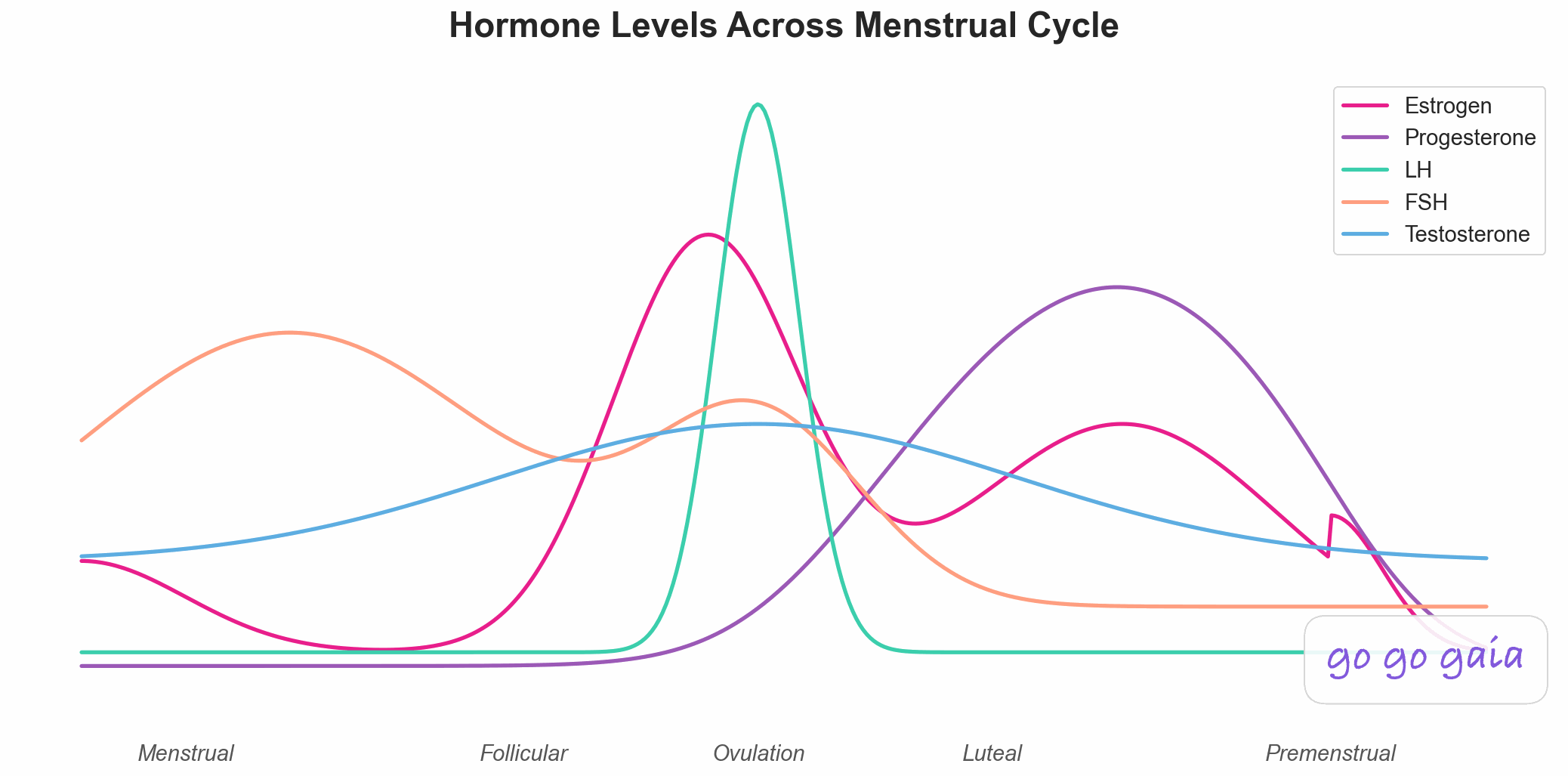
Inito reads four of these hormone signals. Apple Health has no fields for most of them.
What does Inito record, and what does it say about Apple Health?
Inito says its monitor measures LH, estrogen, PdG (a urine metabolite of progesterone) and FSH, and its App Store listing names the same four.[1][2] That's a wider set than a standard LH strip, and we explain how E3G, PdG and the LH surge differ in what each at-home hormone test measures.
We read the App Store listing, the FAQ page and the Inito website for any Apple Health or HealthKit wording and found none.[1][2][3] We also didn't find a documented export feature in those pages. That doesn't prove Inito never writes anything to Apple Health. It means Inito doesn't say it does, so we won't claim it does.
What can Apple Health hold from a hormone monitor?
Apple Health stores data in fixed types. For ovulation tests, HealthKit has one category called Ovulation Test Result, with values for negative, LH surge, estrogen surge and indeterminate.[4][5] Apple also has a separate Progesterone Test Result category, with values for positive, negative and indeterminate.[7] Both are result categories. Neither holds a concentration.
| Signal | What Inito records | What Apple Health can hold | What could transfer |
|---|---|---|---|
| LH | LH reading from the strip[1] | A surge or no-surge result[5] | At most the result, not the number |
| Estrogen (E3G) | Estrogen reading[1] | An "estrogen surge" result value[5] | At most a surge flag |
| PdG | PdG reading[1] | A positive or negative progesterone test result[7] | At most the result, not the number |
| FSH | FSH reading[1] | No FSH value type that we could find[4] | Nothing |
Inito's four-hormone view is a real strength, and it's the reason a simple sync wouldn't be enough. The detail that makes Inito useful is the same detail Apple Health can't carry.
How do you combine Inito with your Apple Watch or other wearable data?
None of these is a perfect sync. Each gets you part of the way, and you can mix them.
1. Keep the detail in the Inito app
Inito's own app is where your four-hormone readings live, so treat it as the source of truth for the numbers. Take a dated screenshot of each cycle's chart so you have your own record.
2. Check for an export or share option in your version
Inito's listing and FAQ don't mention an export or report feature, but Inito's own blog describes a PDF chart export.[2][3][8] The blog says it starts from the share icon on the Chart page and needs at least one complete cycle of testing.[8] We cover the steps in our post on whether Inito exports your data. You don't need an export for Veya: a screenshot of the Inito table view is what it reads.
3. Log the surge result in an app that writes to Apple Health
Since Apple Health can hold a surge or no-surge result, you can log the result of each test day in an app that reads and writes the Ovulation Test Result category.[4] You keep the numbers in Inito and the yes/no in Apple Health, which puts the timing of your LH surge on the same timeline as your Apple Watch data. For what the watch itself estimates, see how Apple Watch ovulation estimates work.
4. Use an app that reads Apple Health and lets you log LH
This is where Veya fits. It reads sleep, HRV, wrist temperature and cycle data from Apple Health, along with the Ovulation Test Result category, so your watch data and any results other apps write there land on one timeline. You can log a strip result or a urine LH number in mIU/mL yourself, and upload lab results as a PDF or photo. Our health patterns page shows how those signals line up across a cycle, and apps that pull wearable, lab and cycle data together compares other options.
You can also bring the numbers in. In the Veya web app (app.myveya.com, Import), choose "Inito chart screenshot" and upload a screenshot of your chart, one cycle at a time. Screenshot the table (list) view for exact values; Veya reads line charts approximately, so the table is the safer choice. Veya reads the LH, E3G, PdG and FSH values (where Inito shows them) for each cycle day and shows your screenshot next to the readings, so you can fix anything before saving. Saved readings sit in your hormone history beside your cycle, sleep, mood and symptoms. Our step-by-step import guide walks through it.
Veya can import your Inito readings from a screenshot. They're stored as monitor readings (ng/mL for E3G, µg/mL for PdG, mIU/mL for LH and FSH), separate from the creatinine-adjusted urine metrics that lab panels report.
How can you check whether your version of Inito writes to Apple Health?
Open the Health app on your iPhone, tap your profile picture, and look under Privacy for Apps. Apple says that list shows every app that has requested access to your Health data, and you can see what each one reads or writes.[6] If Inito appears there, tap it to see which categories it's allowed to use. If it doesn't appear, it isn't connected.
Check again after app updates, since listings change. This post reflects what was public on October 14, 2026. If you're choosing a tracker around a monitor, our ovulation tracker app comparison and fertility tracking app comparison cover where each app sits. Using Mira instead? We wrote the same walk-through in Does Mira sync with Apple Health?
Frequently Asked Questions
Educational information based on published sources and the listings cited below, checked October 14, 2026. Not medical advice.
Does Inito sync with Apple Health?
As of October 14, 2026, Inito doesn't list an Apple Health integration. Neither its App Store listing nor its FAQ page mentions Apple Health. You can check your own version in the Health app under your profile picture, then Privacy, then Apps. If Inito isn't listed there, it isn't connected.
Does Inito work with HealthKit?
Inito doesn't mention HealthKit in its App Store listing or FAQ page. HealthKit is the framework apps use to read and write Apple Health data, so the Apps list in the Health app is the quickest way to see whether your version has requested access.
Can Apple Health store Inito's estrogen, LH, PdG or FSH numbers?
Apple Health has no data types for those values. It has an Ovulation Test Result category that holds a negative, LH surge, estrogen surge or indeterminate result, so at most a surge flag could be stored. A separate Progesterone Test Result category holds only a positive, negative or indeterminate result.
Can you export your Inito data?
Inito's App Store listing and FAQ page don't mention an export, but Inito's own blog describes a PDF chart export from the share icon on the Chart page, once you have at least one complete cycle of testing.[8] We cover the steps in our post on whether Inito exports your data. Keep a dated screenshot of each cycle's chart as a backup too. You don't need an export for Veya: a screenshot of the Inito table view is what it reads.
How do you combine Inito with Apple Watch data?
There's no automatic route that Inito lists. A practical approach is to keep the numbers in Inito and log each surge result in an app that reads Apple Health, so it sits next to your watch's temperature and sleep data. Veya, which we make, does this for wearable data and can import your Inito readings from a chart screenshot, so they sit next to your sleep and cycle data. It isn't an Apple Health sync, because Apple Health has no place to store those hormone values.
References
- Inito. Inito, product website. Checked Oct 14, 2026. www.inito.com
- Inito. Inito Fertility Monitor. App Store listing. Checked Oct 14, 2026. apps.apple.com/us/app/inito-fertility-monitor/id1183799668
- Inito. Frequently asked questions. Checked Oct 14, 2026. www.inito.com/faqs
- Apple Developer Documentation. HKCategoryTypeIdentifier.ovulationTestResult. HealthKit. developer.apple.com/documentation/healthkit/hkcategorytypeidentifier/ovulationtestresult
- Apple Developer Documentation. HKCategoryValueOvulationTestResult. HealthKit. developer.apple.com/documentation/healthkit/hkcategoryvalueovulationtestresult
- Apple Support. Share your data in Health on iPhone. iPhone User Guide. support.apple.com/guide/iphone/share-your-health-data-iph5ede58c3d/ios
- Apple Developer Documentation. HKCategoryTypeIdentifier.progesteroneTestResult. HealthKit. developer.apple.com/documentation/healthkit/hkcategorytypeidentifier/progesteronetestresult
- Inito. How to read your Inito chart: a beginner's guide. Inito blog. Checked Oct 18, 2026. blog.inito.com/how-to-read-your-inito-chart-a-beginners-guide/
Related Reading
How to Import Your Mira or Inito Readings Into Veya
Screenshot your chart, upload it in the web app, check the readings and save them.
Does Mira Sync With Apple Health? Here's How to Get Your Hormone Readings Next to Your Wearable Data
The same walk-through for Mira, including its Oura integration.
LH Strips, BBT, Wearable Temp: What Each Measures
What strips, thermometers, wearables and lab panels each detect.
Best Fertility Tracking App 2026: 8 Apps Compared for TTC
How fertility tracking apps compare, plus a note on hardware monitors.
Apps That Pull Wearables, Labs & Cycle Data Together (2026)
Which apps read wearable, lab and cycle data side by side.
Does Inito Export Your Data? Yes, It Offers a PDF Chart
Inito's PDF chart export and how to bring readings into Veya.
Does Oova Sync With Apple Health? Here's What Oova Says
What Oova says about Apple Health and what Apple Health can hold.