Does Oova Sync With Apple Health? Here's What Oova Says and What Apple Health Can Carry
Oova's App Store listing says the app integrates with Apple Health, and it doesn't say which data moves. Apple Health has no place to store LH, E3G or PdG numbers, so this guide covers what Oova says, what Apple Health can carry from a hormone monitor, and how to line your Oova results up with wearable data.
Quick Answer: Does Oova Sync With Apple Health?
Yes, according to Oova. Its App Store listing says "Oova now integrates with Apple Health" in the notes for version 3.047, listed October 8, 2026.[1] The listing doesn't say which data moves or in which direction.
Whatever Oova writes, Apple Health has no place for hormone numbers. From a hormone monitor, the most it can hold is a test result, such as a surge or no-surge result in its Ovulation Test Result category.[2][3] To see what your version writes, check the Apps list in the Health app on your iPhone.[5]
Educational content about how these tools work, not medical advice. For questions about your own results, please consult your doctor. We make Veya, an app mentioned in this guide, and we've tried to be fair to Oova, whose monitor measures hormones at home in a way Veya doesn't.
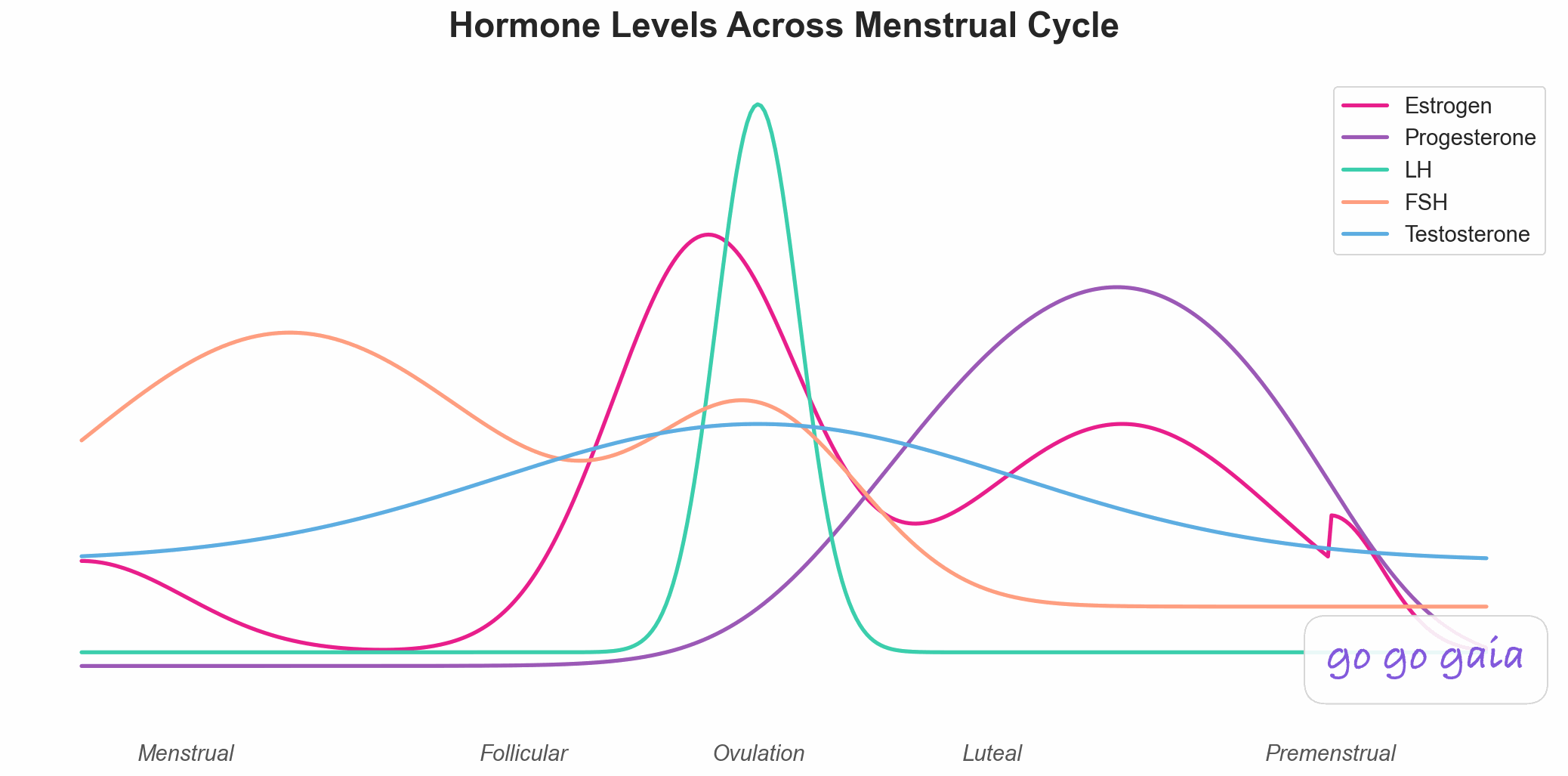
Oova measures urine markers for three of these hormones. Apple Health has no fields for those numbers.
Does Oova connect to Apple Health?
Oova says it connects to Apple Health. The App Store listing for version 3.047 says "Oova now integrates with Apple Health", followed by a line about bringing your hormone data together.[1] That's the whole statement we could read, so it's a clear yes from Oova with an open question about the details.
The listing doesn't say which data Oova writes to Apple Health, which data it reads, or whether the connection runs one way or both. It also doesn't say whether the integration covers hormone readings, a cycle calendar, test results or something else.[1] We haven't verified any of that ourselves, so we won't guess. Oova's listing describes its monitor as measuring LH, E3G and PdG quantitatively, which is a real strength. To see how those three differ, read what each at-home hormone test measures.[1]
What can Apple Health actually hold from a hormone monitor?
Apple Health stores data in fixed types, and none of them is an LH, E3G or PdG concentration. What it can hold from a fertility monitor is a test result. HealthKit has an Ovulation Test Result category with values for negative, LH surge, estrogen surge and indeterminate, plus a separate Progesterone Test Result category.[2][3][4]
So when an app says it works with Apple Health, a hormone monitor's detail can't travel the whole way. The most that could land there is a result flag for a given day.
| Signal | What Oova measures | What Apple Health can hold | What could transfer |
|---|---|---|---|
| LH | LH reading[1] | A surge or no-surge result[3] | At most the result, not the number |
| Estrogen (E3G) | E3G reading[1] | An "estrogen surge" result value[3] | At most a surge flag |
| PdG | PdG reading[1] | A positive or negative progesterone test result[4] | At most the result, not the number |
This is a limit of Apple Health, not of Oova. The detail that makes a quantitative monitor useful is the same detail the shared Health app has nowhere to put.
What does Veya read from Apple Health?
In the iPhone app, Veya reads Apple Health wearable data, such as sleep, HRV and wrist temperature, and it reads the ovulation test result category. If Oova writes ovulation test results to Apple Health, they would show up in Veya beside your wearable data. We haven't verified what Oova writes, so treat that as a possibility to check, not a promise.
Veya never reads hormone values out of Apple Health, because Apple Health has no type that holds them. What Veya does with the data it does have is show it over time next to your sleep, cycle and symptoms, which makes it easier to see how a surge result lines up with a temperature shift. Our health patterns page shows how those signals line up across a cycle.
Can Veya import Oova charts?
Not yet. Veya imports Mira and Inito hormone readings from a chart screenshot in the web app, and Oova is not supported yet. Veya also doesn't read PDF exports or photos of test strips yet.
For Mira and Inito the steps are short. Open app.myveya.com/import, pick "Mira chart screenshot" or "Inito chart screenshot" and upload a screenshot. Then check the readings beside your screenshot, where you can edit a value, change a day or swap two series, and save them to your hormone history. The iPhone app gets the same import in an upcoming update. Our step-by-step import guide walks through it, and the Apple Health walk-throughs for Mira and Inito cover those monitors. For a side-by-side of monitors, see Mira vs Inito vs Premom.
What can you do in the meantime with Oova and Veya?
Keep Oova's app for its hormone readings, and log your LH results in Veya by hand. That gives you the detail from the monitor and the timeline from Veya, without needing any integration to line up.
1. Let Oova be the source of truth for the numbers
Oova's own app is where your LH, E3G and PdG readings live, so treat it as the record of those numbers. A dated screenshot of each cycle gives you a backup of your own.
2. Log the LH result in Veya
In Veya you can log your LH test result yourself each test day. That puts the timing of your LH surge on the same timeline as sleep, temperature and symptoms. It's a manual step, and it's the honest one for now.
3. Check what Oova writes to Apple Health
Open the Health app, tap your profile picture, and look under Privacy for Apps. Apple says that list shows every app that has requested access to your Health data, and you can see what each one reads or writes.[5] If Oova appears there, tap it to see which categories it's allowed to use. Check again after app updates, since listings change and this post reflects what was public on October 18, 2026.
Frequently Asked Questions
Educational information based on published sources and the listings cited below, checked October 18, 2026. Not medical advice.
Does Oova sync with Apple Health?
Oova's own App Store listing says "Oova now integrates with Apple Health" in the notes for version 3.047, listed October 8, 2026. The listing doesn't say which data moves or in which direction. You can check your own version in the Health app under your profile picture, then Privacy, then Apps.
Can Apple Health store Oova's LH, E3G or PdG numbers?
Apple Health has no data types for those values. It has an Ovulation Test Result category that holds a negative, LH surge, estrogen surge or indeterminate result, and a Progesterone Test Result category that holds a positive, negative or indeterminate result. Those are results, not concentrations.
Can Veya import Oova charts?
Not yet. Veya imports Mira and Inito readings from a chart screenshot in the web app, and Oova isn't supported yet. Until then you can log your LH results by hand in Veya and keep Oova's app for its readings.
How do you get Oova results next to your Apple Watch data?
Keep the numbers in the Oova app and look in the Health app to see whether Oova writes an ovulation test result. Veya, which we make, reads Apple Health wearable data and ovulation test results in the iPhone app, so if Oova writes a result there, it would show up beside your sleep and temperature. You can also log LH results in Veya by hand.
References
How we checked: we read Oova's App Store listing on October 18, 2026 and quote it directly. Oova's support pages didn't load for us, so we haven't used them. We haven't tested what Oova writes to Apple Health, so nothing here describes its data flow beyond what the listing says.
- OOVA inc. OOVA. App Store listing, version 3.047. Fetched 2026-10-18. apps.apple.com/us/app/oova/id1487480281
- Apple Developer Documentation. HKCategoryTypeIdentifier.ovulationTestResult. HealthKit. developer.apple.com/documentation/healthkit/hkcategorytypeidentifier/ovulationtestresult
- Apple Developer Documentation. HKCategoryValueOvulationTestResult. HealthKit. developer.apple.com/documentation/healthkit/hkcategoryvalueovulationtestresult
- Apple Developer Documentation. HKCategoryTypeIdentifier.progesteroneTestResult. HealthKit. developer.apple.com/documentation/healthkit/hkcategorytypeidentifier/progesteronetestresult
- Apple Support. Share your data in Health on iPhone. iPhone User Guide. support.apple.com/guide/iphone/share-your-health-data-iph5ede58c3d/ios
Related Reading
How to Import Your Mira or Inito Readings Into Veya
Screenshot your chart, upload it in the web app, check the readings and save them.
Does Mira Sync With Apple Health? Here's How to Get Your Hormone Readings Next to Your Wearable Data
The same walk-through for Mira, including its Oura integration.
Does Inito Sync With Apple Health? Here's What Transfers and What Doesn't
The same walk-through for Inito and its four-hormone readings.
Mira vs Inito vs Premom: Hormone Testing at Home (2026)
How three popular fertility monitors compare on price, hormones and app features.
LH Strips, BBT, Wearable Temp: What Each Measures
What strips, thermometers, wearables and lab panels each detect.