Apps That Pull Wearables, Labs & Cycle Data Together (2026)
Your Oura ring lives in one app. Your CGM lives in another. Your lab PDFs sit in a folder somewhere, and your period app has no idea any of it exists. This guide compares 5 apps that try to pull it together, and looks closely at the one thing most of them miss: showing that data against your cycle phase. If your data starts with an Apple Watch, the Apple Watch cycle tracking page shows what Veya reads from it.
Quick Answer: Which App Pulls Your Health Data Together?
There's no single winner here, because "pull my data together" means different things depending on whether you want a passive hub, an AI-summarized dashboard for your doctor, or a place to actually see patterns. Apple Health is the free automatic hub, Guava Health is best if you work with a provider, Bearable is best for correlating anything against anything, Oura is the best hub for its own ring data, and Veya is the one that overlays wearables, CGM, and labs against your cycle phase. Here's how they compare:
- Best free automatic hub: Apple Health. Nearly every iOS health app already writes to it, no setup required
- Best for provider-connected care: Guava Health. EHR integration, labs, wearables, and AI summaries built around working with a doctor or practice
- Best for custom symptom correlation: Bearable. Track anything, see what correlates with anything else
- Best hub for your ring's own data: Oura. Deep sleep, HRV, temperature, and now AI-validated cycle and ovulation detection from the ring itself
- Best for overlaying it all against your cycle: Veya. Wearables, CGM data, and uploaded labs, all shown against where you are in your cycle
How We Picked These Apps
We compared apps people actually reach for when their health data is split across a wearable, a period tracker, a CGM app, and a stack of lab PDFs. We looked at breadth of data sources each app can pull in (wearables, CGM, labs), whether it does anything with that data beyond storing it, and whether it connects any of it to menstrual cycle phase, which is the piece most general health dashboards leave out entirely. Feature details and pricing were checked in July and August 2026.
Full disclosure: this site is published by Holland Neurotech Inc., the maker of Veya. The list isn't ranked. Each app is presented for the job it's actually good at, and we include our own app only where it genuinely belongs.
If you use a wearable, a period app, and have ever uploaded a lab result anywhere, you already know the problem. Your Oura or Apple Watch data lives in its own app. Your CGM has its own app. Your labs are a PDF from a portal, or a photo in your camera roll. And your period tracker doesn't know any of it exists.
None of those apps talk to each other, so the patterns that would actually be useful, like "my glucose spikes are worse in the days before my period" or "my HRV tanks every luteal phase regardless of sleep," stay invisible. You'd have to line up four different exports by hand to see it.
Full Transparency
This guide is published by Holland Neurotech Inc., the company behind Veya. We've compared each app based on its actual data-pulling capabilities, publicly available information, and (where relevant) our own testing. Every app here does something genuinely well, and the right one depends on what you're trying to see.
Our goal is to help you find the right fit, whether that's Veya or something else.
Educational content, not medical advice. None of the apps below interpret or diagnose from your lab results. For personal concerns, please consult your doctor.
Medical Disclaimer
This article is for educational and informational purposes only and does not constitute medical advice. Storing your lab results or wearable data in an app is not the same as having them interpreted by a clinician. Always review lab results and health data with your doctor or a qualified healthcare provider, especially before making decisions based on what an app shows you. If something in your data concerns you, seek medical attention rather than relying on an app's summary.
Step 1: Why Your Health Data Is Scattered in the First Place
This isn't really your fault. Every wearable maker wants you living inside their app. Every CGM manufacturer builds its own closed ecosystem. Hospitals and labs each run their own patient portal. None of these companies has much incentive to make their data easy to move somewhere else.
Before picking an app to fix this, it helps to know what you actually need pulled together:
Wearable Data
Sleep, heart rate, HRV, temperature, and activity, from an Apple Watch, Oura Ring, Garmin, Fitbit, or similar. Most of this can flow into a hub automatically once you connect the device.
CGM and Glucose Data
If you use a continuous glucose monitor like Dexcom or FreeStyle Libre, or a metabolic ring like Ultrahuman, that data usually lives in its own app unless something else is built to pull it in.
Lab Results
Bloodwork, hormone panels, thyroid tests. Usually a PDF from a patient portal or a piece of paper from your doctor's office. Very few apps let you actually store and revisit this alongside everything else.
Cycle Phase
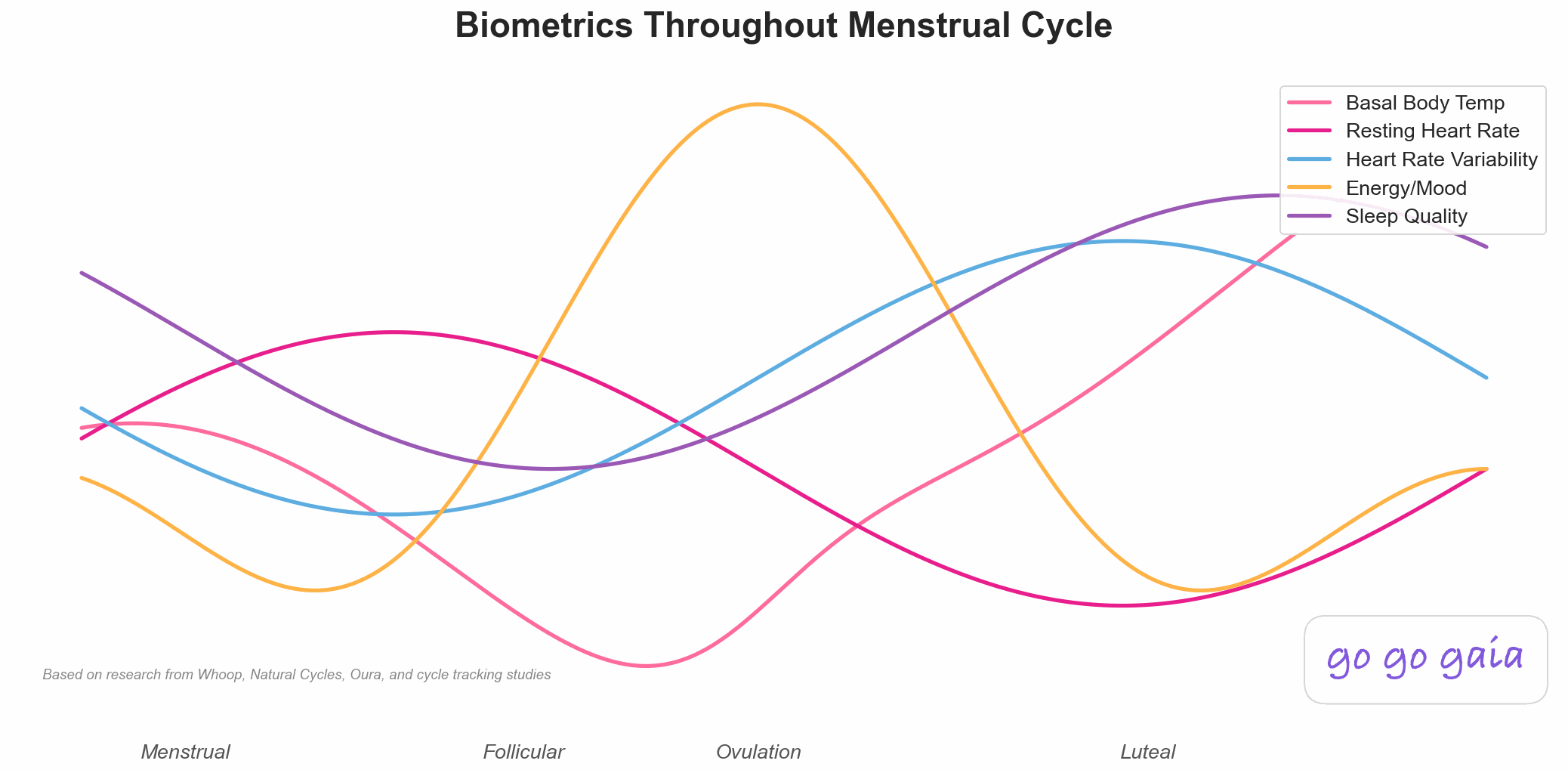
The piece almost nobody connects to the rest. Your sleep, HRV, glucose response, and energy don't behave the same way in the follicular phase as they do in the luteal phase. Wearables can already detect a lot of this shift, but most general health dashboards never show it against your actual cycle.
Step 2: The 5 Apps Compared
For a Free Automatic Hub: Apple Health
Best if you want: Everything your iOS apps already collect, sitting in one place, without setting anything up.
Key Features
- Built into every iPhone, free, no account needed beyond your Apple ID
- Automatically receives data from nearly any iOS wearable app or fitness app via HealthKit
- Basic Cycle Tracking module for logging periods and symptoms
- Health Records can pull in labs and visit summaries, but only from hospital systems that participate
- One tap to export a PDF summary for a doctor's visit
Strengths
- It's already there. If you own an iPhone, you're already collecting data in it whether you open the app or not
- Free, with no premium tier or upsells
- The closest thing to a universal iOS data pipe, since most other apps are built to write to it
- Health Records, where available, pulls real clinical data directly from participating hospital systems
Limitations
- It's a storage shelf, not an analyst. Sleep, HRV, and cycle data each sit on their own card with no correlation between them
- No overlay of wearable data against cycle phase
- Health Records only works if your hospital or clinic participates. Most people can't use it at all
- No manual lab upload. You can't just drop in a PDF from a lab that isn't a participating system
- No CGM-specific dashboard, even though some glucose apps can write basic readings to it
- iOS only. There's no Apple Health on Android
Who Should Choose This
Apple Health is ideal if you:
- Just want your data captured somewhere without extra effort
- Have a hospital system that supports Health Records
- Plan to use a second app on top of it for actual analysis
- Want a free, no-account-required option
Pricing: Free, built into iOS.
Download: Pre-installed on all iPhones.
For Provider-Connected Care: Guava Health
Best if you want: One dashboard that combines your medical records, labs, and wearable data, especially if you're working with a doctor or functional medicine practice.
Key Features
- EHR integrations that pull in medical records and lab results from participating providers
- Wearable and device syncing from Garmin, Oura, Fitbit, and Dexcom
- Daily symptom and lifestyle logs inside the Guava app
- AI-generated summaries and alerts that flag meaningful changes across your data
- A companion Provider Dashboard used by practices to monitor patients remotely
- Free consumer app, available on iOS, Android, and web, in 20+ languages
Strengths
- The strongest EHR and lab integration of any app in this comparison, when your provider supports it
- Direct Dexcom CGM syncing alongside multiple wearable brands
- AI summaries are built for sharing with a provider, not just self-review
- Cross-platform, including a full web version
- Rated well on both app stores (4.7 and 4.9 respectively, per its own listings)
Limitations
- Not built around the menstrual cycle. There's no cycle-phase view, so it won't show you how your labs or wearable data shift across your cycle
- Its deepest features (EHR pull-in, provider dashboard) depend on your clinic or practice using Guava, which most people's doctors don't
- General health platform, not built specifically for women's health or reproductive tracking
- Best suited to people actively managing a condition with a provider, less useful as a general wellness tracker
Who Should Choose This
Guava Health is ideal if you:
- Work with a provider or practice that already uses Guava
- Manage a chronic condition and want labs, records, and wearable data together
- Want AI-generated summaries to bring to appointments
- Don't need cycle-specific tracking
Pricing: Free for the consumer app. Provider-side dashboard pricing varies by practice.
Download: Available on iOS, Android, and web.
For Custom Symptom Correlation: Bearable
Best if you want: To track anything you can think of and see how it correlates with everything else you're tracking.
Key Features
- Fully customizable symptom and factor tracking
- Reads sleep, heart rate, HRV, and steps from Apple Health, Health Connect, Fitbit, Garmin, and Samsung Health
- An "Impacts" view that surfaces correlations between anything you track
- Period tracking available as one module among many, not the core focus
- Medication, supplement, and treatment logging
Strengths
- The most flexible correlation engine of any app here. If you can name it, you can track it and see what it correlates with
- Pulls from more third-party wearable brands than most single-purpose apps
- Popular with people managing multiple chronic conditions at once
- Generous free tier, GDPR-compliant, doesn't sell data
Limitations
- Wearable sync is mostly one-directional (pulling in, not writing back), and it doesn't connect that data to cycle phase specifically
- No CGM ingestion
- No lab result storage or upload
- No nutrition or macro tracking
- The flexibility comes with setup time. It takes a while to configure what you actually want tracked
Who Should Choose This
Bearable is ideal if you:
- Want to track very specific, custom factors that most apps don't have a preset for
- Care more about correlation than about cycle-phase context
- Already have your wearable connected to Apple Health or Health Connect
- Need an Android option
Pricing: Free (generous tier), Premium ~$34.99/year or ~$6.99/month.
Download: Available on iOS and Android.
For Deep Data on Your Own Ring: Oura
Best if you want: The most detailed possible picture of your own sleep, HRV, temperature, and readiness, plus increasingly accurate cycle and ovulation detection built from that data.
Key Features
- Overnight temperature, HRV, resting heart rate, and sleep stage tracking from the ring
- Cycle Insights, which uses your temperature trend to detect ovulation and forecast your period, reporting roughly 96% ovulation detection accuracy in Oura's own published validation study
- A Fertile Window feature combining heart rate, HRV, temperature, and respiratory rate
- Oura Advisor, an AI assistant launched in February 2026 that answers reproductive health questions inside the app
- A partnership with Natural Cycles for FDA-cleared, temperature-based digital birth control
Strengths
- Unmatched depth on the metrics it does track, since it owns the sensor generating the data
- Its cycle-phase detection is validated and specifically built around the temperature shift that happens after ovulation, which is the same signal HRV and resting heart rate patterns partly reflect
- The Natural Cycles integration is a genuinely useful option for hormone-free contraception or conception planning
- Comfortable, unobtrusive hardware that people actually wear consistently, which matters for data quality
Limitations
- It's a hub for its own data, not other people's. It doesn't ingest data from a Garmin, Fitbit, Apple Watch, or CGM
- No lab result storage
- No nutrition or workout planning
- Requires buying the ring hardware plus an ongoing membership subscription on top of it
- Correlation stays within its own metrics. It won't connect your cycle data to something like glucose or a symptom you logged elsewhere
Who Should Choose This
Oura is ideal if you:
- Want the ring specifically and don't need to combine data from other wearables
- Care most about validated, temperature-based cycle and ovulation detection
- Are interested in hormone-free contraception via the Natural Cycles integration
- Don't need lab results or nutrition tracking in the same app
Pricing: Ring purchase (roughly $300-$550 depending on model) plus a monthly membership subscription required for full features.
Download: App available on iOS and Android, requires an Oura Ring.
For Overlaying Data Against Your Cycle: Veya
Best if you want: Wearable data, CGM readings, and your own uploaded labs shown together, and shown against your actual cycle phase instead of on separate screens. The Apple Watch cycle tracking page walks through what Veya pulls in from the watch.
Key Features
- 350+ trackable metrics with wearable sync
- CGM ingestion from Dexcom, Libre, and Ultrahuman
- Lab result upload (PDF or CSV) through the web app, no participating hospital system required
- Everything, wearable data, CGM readings, and uploaded labs, overlaid with your cycle phase
- Correlation insights across data sources, not just within one
- General workout plans that adapt to your cycle phase, plus calorie and macro targets
- Health Wrapped, a quarterly and yearly recap scoring physical, mental, sleep, and hormonal health
- 1-click logging for anything you're tracking manually
Strengths
- Ingests wearables, CGM data, and manually uploaded labs, then shows all three against cycle phase in one view, which none of the other apps here do together
- Doesn't require your provider or hospital to use a particular system. You upload your own lab PDF or CSV
- Combines the data layer with day-to-day features (nutrition targets, workout plans) instead of being purely a viewer
- Free for most core tracking and data ingestion
Limitations
- iOS only, with lab upload happening through the web app rather than natively in the phone app
- Doesn't connect to EHR systems the way Guava does, so there's no automatic pull from your provider's records
- Newer app with a smaller user community than Apple Health or Oura
- Stores and displays your labs, it doesn't interpret or flag them clinically. That conversation still happens with your doctor
Who Should Choose This
Veya is ideal if you:
- Already have data spread across a wearable, a CGM, and lab PDFs and want it in one view
- Want to see whether patterns in your sleep, glucose, or HRV actually shift with your cycle, not just assume they do
- Want nutrition and workout guidance that accounts for cycle phase, not just raw data storage
- Prefer uploading your own labs rather than depending on your provider's system
Pricing: Free for most tracking and data ingestion. Premium available for full AI insights.
Download: Available on iOS App Store
Worth Noting: Health Connect and Google Fit (Android)
If you're on Android, there's no direct equivalent to Apple Health's ecosystem, but there's a close one. Health Connect is Google's on-device layer that lets apps share fitness and health data with each other, and Google Fit sits on top of it for basic activity tracking.
Like Apple Health, both are free data pipes rather than apps that analyze or overlay anything for you. If you're on Android and want more than storage, Bearable and Guava Health both connect to Health Connect and are available free on Google Play.
Feature Comparison Table
Here's how the 5 apps stack up on pulling different types of health data together:
| Feature | Veya | Apple Health | Guava Health | Bearable | Oura |
|---|---|---|---|---|---|
| Wearable Sync (Watch, Garmin, Fitbit) | ✅ Multiple brands | ✅ Automatic hub | ✅ Garmin, Oura, Fitbit | ✅ Via Health Connect/Apple Health | ⚠️ Its own ring only |
| CGM / Glucose Ingestion | ✅ Dexcom, Libre, Ultrahuman | ⚠️ Only if source app writes to it | ✅ Dexcom | ❌ | ❌ |
| Lab Result Upload | ✅ PDF/CSV, web app | ⚠️ Only participating hospitals | ✅ EHR integrations | ❌ | ❌ |
| Cycle-Phase Overlay on Data | ✅ Wearables, CGM & labs | ❌ | ❌ | ⚠️ Basic period module | ✅ Temperature-based, own data only |
| Cross-Source Correlation Insights | ✅ | ❌ | ✅ AI summaries | ✅ "Impacts" view | ⚠️ Within own metrics only |
| Nutrition & Macro Tracking | ✅ Free | ⚠️ Basic, via connected apps | ❌ | ❌ | ❌ |
| Cycle-Adaptive Workout Plans | ✅ | ❌ | ❌ | ❌ | ❌ |
| AI Insights / Recaps | ✅ Health Wrapped | ❌ | ✅ Alerts & summaries | ❌ | ✅ Oura Advisor |
| Provider / EHR Integration | ❌ | ⚠️ Limited hospitals | ✅ Core feature | ❌ | ❌ |
| Cost | Free (Premium optional) | Free | Free | Free (Premium optional) | Ring + membership |
| Platforms | iOS only | iOS only | iOS, Android, web | iOS, Android | iOS, Android (+ ring) |
Step 3: Making Your Decision
Here's the bottom line for each app:
Choose Apple Health if:
- You just want a free, automatic place for your iOS data to land
- Your hospital system supports Health Records
- You plan to use a second app on top for actual analysis
Choose Guava Health if:
- You're managing a condition with a provider or practice that supports it
- You want labs, EHR records, and wearable data pulled together automatically
- You want AI-generated summaries to bring to appointments
- You don't need cycle-specific tracking
Choose Bearable if:
- You want to track custom symptoms or factors most apps don't have a preset for
- Correlation matters more to you than cycle-phase context
- You need an Android option
Choose Oura if:
- You want the ring specifically and don't need other wearable brands folded in
- Validated, temperature-based cycle and ovulation detection is your priority
- You're interested in the Natural Cycles birth control integration
Choose Veya if:
- Your data is spread across a wearable, a CGM, and lab PDFs and you want it in one view
- You want to see whether your sleep, glucose, or HRV patterns actually shift with your cycle
- You want nutrition and workout guidance that adjusts for cycle phase
- You'd rather upload your own labs than wait on your provider's system to support an integration
Privacy Considerations
Combining your wearable, CGM, and lab data in one place means that one app now holds a lot about you. Here's how each handles it:
- Apple Health keeps data on-device by default and is widely regarded as privacy-strong, since Apple's business model isn't built around selling health data.
- Guava Health handles clinical data through EHR integrations, which fall under stricter healthcare data-handling requirements given its use with medical practices.
- Bearable is GDPR-compliant and states it doesn't sell user data.
- Oura collects continuous biometric data from the ring. Review its current privacy policy directly, since a wearable worn 24/7 generates more data than an app you open occasionally.
- Veya keeps data private and doesn't sell it to third parties. Uploading lab results is optional and happens through the web app under your control.
Whichever app you choose, it's worth reading the current privacy policy rather than assuming, especially for anything handling lab results or continuous biometric data.
Getting the Most Out of a Combined Dashboard
Whichever app you land on, a few things make it actually useful instead of just another place your data sits unread:
- Connect your wearable first. That's the data that requires the least ongoing effort from you, and it's usually the fastest way to start seeing something.
- Add labs when you get them, not months later. Upload a lab PDF the same week you receive it. Waiting means you'll eventually lose track of where it is.
- Give it at least one full cycle before judging the patterns. A single week of data won't show you anything about how your metrics shift with your cycle. A full cycle, or two, will.
- Don't try to interpret labs yourself. An app that stores your labs is not the same as a clinician reading them. Bring what you've collected to your doctor rather than drawing conclusions on your own.
- Check what's actually connecting, not just what's installed. It's easy to assume a wearable is syncing when it stopped weeks ago. Spot-check the data periodically.
Pro Tip
If you're not sure which app fits, start with whichever one already has the least setup friction for the data source you care about most. If that's your wearable, start there. If it's labs, prioritize an app that lets you upload your own PDFs rather than waiting on a provider integration.
Frequently Asked Questions
What's the best app for seeing wearable, lab, and cycle data in one place?
It depends on what you're trying to do. Apple Health is the free, automatic hub that most iOS apps already write to, but it doesn't analyze anything. Guava Health is built for people working with a provider who want to combine EHR records, labs, and wearable data with AI summaries. Bearable is best if you want to correlate custom symptoms against anything you track. Oura is the best hub for its own ring data specifically. Veya pulls wearables, CGM data, and lab uploads together and overlays all of it against your cycle phase, which none of the others do.
Can Apple Health show my sleep and HRV data against my cycle phase?
Not really. Apple Health has a Cycle Tracking module and it stores sleep, HRV, and other wearable metrics, but each lives on its own card. There's no built-in view that overlays your HRV or sleep trend against where you are in your cycle. You'd need a separate app that reads from Apple Health and adds that layer on top.
Does Guava Health work for period or cycle tracking?
Guava Health is built as a general health dashboard for combining EHR records, labs, and wearable data, often for people managing a chronic condition alongside a provider. It's not built around the menstrual cycle specifically, so it won't show you cycle phases or overlay your data against them the way a women's health app does.
Can I upload my own lab results to a health tracking app?
It depends on the app. Guava Health connects to labs through EHR integrations with participating providers. Apple Health's Health Records feature only works if your hospital system participates, and even then it's not a manual upload. Veya lets you upload lab PDFs or CSV files yourself through its web app, so you're not dependent on your provider using a specific system. None of these apps interpret or diagnose from your labs. They store and display what you upload so you and your doctor can review it together.
Do I need a wearable to use one of these apps?
Every app in this comparison works with manual logging alone. A wearable just fills in data you'd otherwise have to enter by hand, like overnight HRV, resting heart rate, or temperature. If you don't have a wearable yet, start logging manually and add a device later. The historical data you build up manually stays useful either way.
What CGMs and glucose monitors can sync with a health tracking app?
Dexcom and FreeStyle Libre are the two most widely supported continuous glucose monitors across health apps, and Ultrahuman's ring and CGM combo is increasingly supported too. Veya ingests data from all three (Dexcom, Libre, and Ultrahuman) and overlays glucose trends against your cycle phase. Apple Health can receive glucose data if the CGM's own app writes to HealthKit, but it won't connect that data to anything else automatically.
Is there a free option for Android users who want their health data together?
Health Connect is Google's version of Apple Health: a free, on-device layer that lets Android apps share fitness and health data with each other, and Google Fit sits on top of it for basic activity tracking. Like Apple Health, it's a passive data pipe rather than an app that analyzes or overlays your data for you. Guava Health and Bearable are both cross-platform and available free on Android if you want an app that does more with the data than just store it.
Final Thoughts
There's no single app that wins at everything here, because "combine my health data" covers a few genuinely different jobs. If you just want a free place for your data to land automatically, Apple Health already does that without you doing anything. If you're working with a provider on a chronic condition, Guava Health's EHR and lab integration is hard to beat. If correlation across custom symptoms is what you're after, Bearable is the most flexible. If you specifically want the deepest data on your own ring, Oura keeps getting better at validated cycle and ovulation detection.
And if what you actually want is to see your wearable data, your CGM readings, and your own uploaded labs shown against your cycle phase instead of on four separate screens, that's the gap Veya is built to close.
Whichever you pick, the value isn't in having the data sitting somewhere. It's in actually looking at it often enough to notice what changes and when.
Related Articles
- How Wearables Track Your Cycle: What the Data Actually Shows
- HRV & Resting Heart Rate Across Your Cycle: What the Patterns Mean
- Cycle Tracking with Wearables: What Your HRV & Temp Data Mean
- Best Symptom Tracker App for Women 2026: 5 Apps Compared
Other App Comparisons
- Best PCOS Tracking App 2026: 7 Apps Compared
- Best Fertility Tracking App 2026: 8 Apps Compared for TTC
- Best Period Tracker App 2026: 6 Apps Compared
- Best Perimenopause App 2026: 8 Apps Compared
Want to See Your Data Against Your Cycle?
If you're tired of checking four apps to piece together one picture, download Veya free and connect your wearable, CGM, or upload a lab result to see how it looks overlaid with your cycle.