Best App to Track Cervical Mucus and Discharge (2026)
For classic fertility awareness charting: Kindara. For method-specific templates: Read Your Body. For a temperature-led, FDA-cleared contraception method rather than mucus observation: Natural Cycles. For a quick discharge tag in a minimal cycle tracker: Clue. For discharge logged alongside cycle, LH tests, mood and sleep: Veya. These apps record what you log; they don't interpret changes. If you'd like to see how Veya handles discharge logging for fertility, the fertility tracker page walks through it.
Full Transparency
This guide is published by Holland Neurotech Inc., the company behind Veya. Veya is one of the five apps compared here. We included it because we think it's a strong option for this use case, and we've been honest about its limitations too. Every app on this list has real strengths, and the best one for you depends on how structured or simple you want the daily log to be.
Quick Answer: Which App Should You Use?
The right pick depends on how much structure you want around the logging itself. Here are the picks by use case:
- For classic FAM-style charting: Kindara. A chart-based app built around fertility awareness charting
- For community-taught fertility awareness methods: Read Your Body. A non-profit, community-driven app with templates for specific taught methods
- For a temperature-led method rather than mucus observation: Natural Cycles. Estimates ovulation from BBT, not from mucus observation
- For privacy plus simple daily tags: Clue. Science-first cycle tracker with discharge as one of its tracking categories
- For discharge logging alongside everything else: Veya. Cycle, symptom, and discharge logging plus LH tests, mood, and sleep in one app
You know the days your discharge changes. What you don't have is an easy way to write it down every day and actually see the pattern later. This guide covers what a well-documented cervical mucus pattern looks like across the cycle, 5 apps you can use to log it daily, and what actually makes a daily log stick.
How We Picked These Apps
We shortlisted the 5 apps below from what people actually use to log cervical mucus and discharge changes day to day, and compared them on the criteria that matter most for this: how detailed the mucus categories are, how fast a daily log takes, whether the app is built for a specific fertility awareness method, and whether it's a dedicated charting tool or part of a broader cycle tracker. Prices and platforms were re-checked against each app's App Store listing in October 2026 and can change, so check the listing. We read each app's current description rather than relying only on marketing pages.
Full disclosure: this site is published by Holland Neurotech Inc., the maker of Veya. The list isn't ranked. Each app is presented as the fit for a specific need, we include our own app only where it genuinely belongs, and we say plainly when a competitor is the better choice.
Medical Disclaimer
This article is for educational and informational purposes only and does not constitute medical advice. It does not diagnose conditions, and it is not guidance on contraception or on trying to conceive. Cervical mucus tracking apps record what you log. They don't interpret your health or tell you what a specific change means. Always talk with your doctor, gynecologist, or other qualified healthcare provider about symptoms, fertility questions, or any changes you're concerned about. Individual patterns vary, and what's typical for one person may not be typical for another.
What does cervical mucus look like across the cycle?
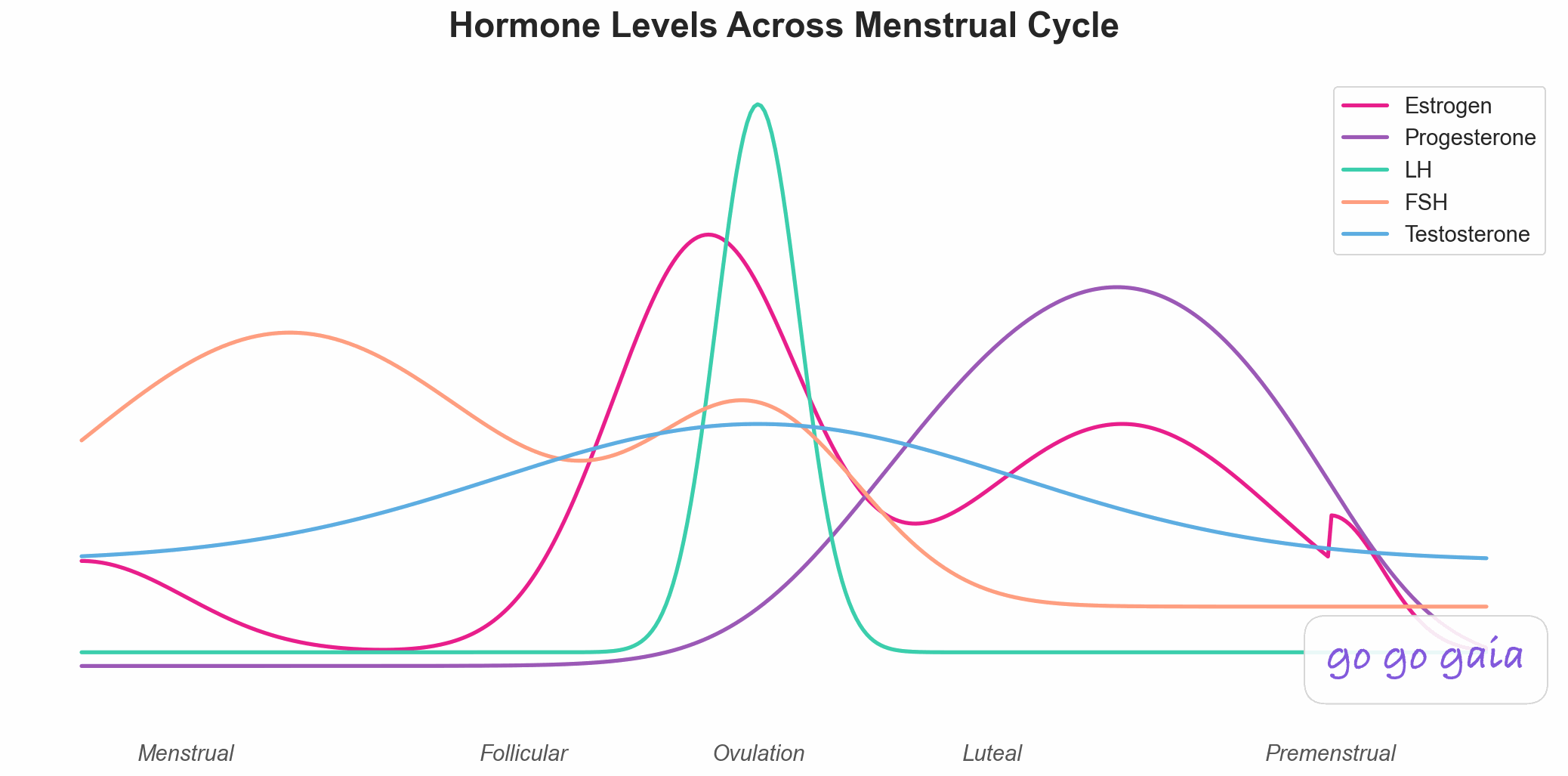
Cervical mucus follows a well-documented general pattern across the menstrual cycle, and daily logging is a long-established fertility awareness practice. Right after your period, mucus tends to be dry or minimal. Moving toward the middle of your cycle, it typically becomes creamier. As ovulation nears, many people notice it turn clearer, wetter, and stretchier, sometimes described as an egg-white texture. After ovulation, it tends to return to being thicker and drier again[1].
This dry-to-creamy-to-clear-and-stretchy-and-back arc is the pattern that fertility awareness methods are built around. Charting it daily, by hand or in an app, is a long-standing fertility awareness practice. That's why dedicated charting apps like Kindara exist.
Everyone's baseline is a little different, and cycle length variation shifts exactly when each stage shows up. That's the whole reason to log your own cycles rather than relying on a generic calendar guess. If you're trying to understand ovulation signs more broadly, including how mucus fits alongside other signals like BBT and LH tests, our guide to telling if you're ovulating covers that in more depth.
One more note: changes in discharge that don't seem to follow your normal cycle pattern are a topic for a healthcare provider, not something to try to diagnose from an app or an article. This guide is about the logging practice, not about interpreting what any specific change might mean.
How We Compared These Apps
We compared each app on its App Store listing, published pricing, and current description, with App Store prices re-checked in October 2026. We did not run a clinical study, and we haven't hands-on tested every feature of every app. And full disclosure: we make Veya, one of the five apps here.
For this use case, we weighted four things most heavily: how detailed and customizable the mucus or discharge categories are, how fast a daily entry takes, whether the app is designed around a specific fertility awareness method or is a general cycle tracker, and whether discharge logging lives alongside your other cycle data or in a separate module.
The 5 Apps Compared
The five apps below split into three groups: dedicated fertility awareness charting apps (Kindara, Read Your Body), a temperature-led method (Natural Cycles), and general cycle trackers where discharge is one tracking category among several (Clue, Veya). The right pick depends on how much structure around the method itself you want, versus how much you want it folded into everything else you're already tracking.
For Classic FAM-Style Charting: Kindara
Best if you want: A chart-based app built specifically around fertility awareness charting.
Key Features
- Charting of period, basal body temperature (BBT), cervical mucus, and cervical position, per its App Store listing[2]
- Full chart view showing all your signs together over time
- Cervical mucus logging can also be added from Apple Watch
- Chart-first design rather than a general symptom tracker
Strengths
- Kindara is a chart-first app for fertility awareness charting, with a full chart view of your signs over time
- The chart view is built for exactly this kind of side-by-side sign comparison, not adapted from a general tracker
- Its listing promises data-driven predictions based on your own data, so you get more than a blank chart
Limitations
- The interface has an older, function-first feel compared to newer cycle apps
- Premium unlocks extras such as unlimited custom data, moods, and a lunar calendar, per its listing
- Limited broader health tracking beyond fertility signs and, on Premium, moods
Who Should Choose This
- You want a dedicated charting tool built specifically for fertility awareness signs
- You're already comfortable with, or want to learn, chart-based observation
- You mainly need mucus, BBT, and cervical position logged together, without extra features
Pricing
Free to download; the App Store listing shows Kindara Premium at $4.99 for one month and $49.99 for one year, with a 45-day free trial for new accounts[2] (as of October 2026). Available on the iOS App Store.
For Community-Taught Fertility Awareness Methods: Read Your Body
Best if you want: A non-profit, community-driven app with templates matched to specific taught methods.
Key Features
- Customizable cervical fluid categories that can match specific fertility awareness-based methods
- Settings templates for fertility awareness-based methods that its listing describes as approved by institutes including SymptoPro, FEMM, and Justisse[3]
- Cervix and sensation tracking alongside mucus
- BBT charting with Tempdrop integration, plus hormone test logging (LH, progesterone, pregnancy tests, Clearblue monitor)
Strengths
- Describes itself as a female-led, non-profit, privacy-focused cycle app, aimed at people who chart using a specific taught method
- The method-matched templates mean the mucus categories and language line up with what an instructor may have actually taught you
- Describes itself as "100% community-driven and user-funded"
- Cross-platform (iOS and Android)
Limitations
- The method-matching setup takes more upfront time than a simple tap-to-log app
- A smaller, community-run app rather than a large commercial one
- No broader health tracking outside fertility awareness signs
Who Should Choose This
- You've been taught a specific fertility awareness method and want an app that matches its exact categories
- You value a community-built, smaller company over a large commercial app
- You want cervix and sensation tracking alongside mucus, not just mucus alone
Pricing
Free to try for 30 days, then a supporter payment; the App Store listing shows $2.69 monthly and $20.99 annually[3] (as of October 2026). Available on iOS and Android.
For a Temperature-Led Method Rather Than Mucus Observation: Natural Cycles
Best if you want: A method that estimates ovulation from daily basal body temperature rather than from mucus observation.
Key Features
- Daily BBT-based algorithm that estimates ovulation from temperature data
- Built around temperature rather than mucus observation, per its App Store listing[4]
- A free NC° Band comes with the annual subscription, per its App Store listing
Strengths
- Natural Cycles is the app here that carries FDA clearance as a contraceptive device (FDA De Novo decision granted August 10, 2018)[5]. Whether a fertility awareness method is right for you is a conversation for a healthcare provider
- It works from daily temperature readings rather than mucus observation, so it doesn't depend on your discharge observations being detailed or consistent
- The FDA record lists Natural Cycles Nordic AB of Stockholm, Sweden as the applicant
- Cross-platform (iOS and Android)
Limitations
- Mucus tracking is a secondary feature here, not the app's design center, so the mucus categories are lighter than a dedicated charting app
- Subscription-based
- The daily temperature routine requires a reasonably consistent wake time to get usable morning readings
Who Should Choose This
- Temperature confirmation, not mucus observation, is your main interest
- You are primarily interested in a daily temperature routine rather than mucus observation
- You're weighing fertility awareness-based contraception with a healthcare provider and want to understand what a temperature-led app involves
Pricing
Subscription-based; the App Store listing shows $149.99 for the annual plan (which includes a free NC° Band) and $21.99 monthly[4] (as of October 2026). Available on iOS and Android.
For Privacy Plus Simple Daily Tags: Clue
Best if you want: A clean, science-first cycle tracker where discharge is one of several tracking categories, with a detailed privacy policy.
Key Features
- Discharge tracking as one of a long list of built-in tracking categories, with options for texture and amount
- Cycle tracking with phase information and predictions
- Custom tags for anything not covered by the built-in categories
- Science-informed educational content
Strengths
- Made in Berlin, with data handling it says meets German and EU legal requirements[6]
- Discharge logging takes just a couple of taps alongside your period and symptom log, no separate app needed
- Clean, minimal interface that's quick to use daily
- Cross-platform (iOS and Android)
Limitations
- Discharge categories are less detailed than a dedicated fertility awareness charting app
- Pattern analysis is limited. You'll mostly spot trends by scrolling back through past cycles yourself
- Free users see regular prompts to upgrade to Clue Plus
Who Should Choose This
- You want discharge logged as part of general cycle tracking, not as its own charting practice
- Privacy is a top priority for you
- You're happy to review your own data for patterns rather than getting computed insights
Pricing
Free (with upgrade prompts); Clue Plus is $39.99 for 12 months or $9.99 for 1 month on the App Store[7] (as of October 2026). Available on iOS and Android.
For Discharge Logging Alongside Everything Else: Veya
Best if you want: Cycle, symptom, and discharge logging in the same app as LH test results, mood, and sleep, so all your fertility-adjacent data lives together. The fertility tracker page shows how discharge entries sit next to LH results and temperature.
Key Features
- Daily discharge and symptom logging alongside cycle tracking, with phase context built in
- LH test result logging for people also tracking ovulation with test strips
- Mood, sleep, and fitness tracking in the same app, so discharge logs sit next to your other daily data rather than in a separate tool
- Passive wearable data (Apple Watch, Oura, Garmin, WHOOP) fills in sleep without manual logging
Strengths
- Cycle, symptom, discharge, mood, and sleep tracking all live in one app, so you're not juggling a charting app and a separate period tracker
- LH test logging sits alongside discharge logging, useful if you're comparing both signals day to day
- We don't sell your data (see our privacy policy)
Limitations
- iOS only. No Android version yet
- Not built around a specific fertility awareness method, so it doesn't offer the method-matched templates that Read Your Body does
- Newer app with a smaller community than Clue or Kindara. No dedicated FAM forums inside the app
Who Should Choose This
- You want discharge tracking in the same place as your cycle, mood, sleep, and LH tests, rather than across separate apps
- You're on iPhone and prefer one app over juggling two or three
- You wear an Apple Watch, Oura, Garmin, or WHOOP and want sleep data included without extra effort
Pricing
Free to download with most features included, Premium $9.99/month or $49.99/year[8] (as of October 2026). Available on the iOS App Store.
Feature Comparison Table
Quick read of the table: Kindara and Read Your Body are the two dedicated fertility awareness charting apps, Natural Cycles is the temperature-led method, and Clue and Veya fold discharge logging into a broader cycle tracker. Here's the full picture (✅ full support, ⚠️ partial, 🔒 premium only, ❌ not available):
| Feature | Kindara | Read Your Body | Natural Cycles | Clue | Veya |
|---|---|---|---|---|---|
| Built for cervical mucus charting | ✅ Core focus | ✅ Core focus | ⚠️ Temperature-led | ⚠️ One category | ⚠️ One category |
| Method-matched templates | ⚠️ General FAM | ✅ Named methods | ❌ Own algorithm | ❌ None | ❌ None |
| BBT charting | ✅ Core feature | ✅ With Tempdrop | ✅ Core algorithm | ⚠️ Basic | ⚠️ Via wearable |
| LH test logging | ✅ Included | ✅ Included | ❌ Not core | ⚠️ Basic | ✅ Included |
| Cycle & period tracking | ✅ Included | ✅ Included | ✅ Core focus | ✅ Core focus | ✅ With phase context |
| Broader health tracking (mood, sleep, fitness) | ❌ None | ❌ None | ❌ None | ⚠️ Symptom tags | ✅ Mood, sleep, fitness |
| FDA-cleared for contraception | ❌ Not cleared | ❌ Not cleared | ✅ FDA-cleared | ⚠️ Not reviewed here | ❌ Not cleared |
| Free tier quality | ✅ Free to download, 45-day trial | ✅ 30-day trial | ❌ Subscription only | ⚠️ Upgrade prompts | ✅ Generous |
| Platforms | iOS (App Store listing) | iOS + Android | iOS + Android | iOS + Android | iOS only |
| Best for | Classic FAM charting | Taught methods | Temperature-led method | Privacy + simple tags | All-in-one logging |
When is another app the better choice?
Veya isn't the right pick for everyone reading this, and several of these apps win outright for specific situations. Here's where we'd honestly point you elsewhere, in a couple of sentences each.
Choose Kindara if you want a charting app
If you already think of cervical mucus tracking as "charting" in the traditional fertility awareness sense, Kindara is built around that kind of charting. The chart view is built specifically for comparing mucus, BBT, and cervical position side by side.
Choose Read Your Body if you've been taught a specific method
If an instructor taught you SymptoPro, FEMM, Justisse, the Marquette Method, or another named fertility awareness-based method, Read Your Body's method-matched templates will feel far more familiar than a general app's default categories. It's also the pick if a non-profit, community-driven app matters to you.
Choose Natural Cycles if temperature logging, rather than mucus observation, is the signal you'd rather build around
If mucus observation isn't the signal you want to rely on and you're more interested in a temperature-confirmed method, Natural Cycles is built around exactly that. Temperature, not mucus, is the signal the app is built around.
Choose Clue if privacy is your top priority
Clue is made in Berlin and says its data handling meets German and EU legal requirements. If you want discharge logged as one quick tag inside an otherwise minimal tracker with that data-handling profile, Clue does that well.
What should you log for the pattern to show up?
Check once a day, at roughly the same time, and log one word for what you notice: dry, sticky, creamy, or clear and stretchy. Keep it up for at least 2 full cycles. That's the core method. Here's how to make it stick:
- Pick a consistent time. Many people check when they use the bathroom in the morning. Consistency matters more than which time you pick.
- Use the same few words every time. Whether you use an app's built-in categories or your own shorthand, keep the labels stable across cycles so you can compare like with like later.
- Log your period dates alongside it. The pattern only becomes visible when you can see mucus changes relative to where you are in your cycle, not as a standalone log.
- Note anything unusual in a single line. Travel, illness, a new product. A quick note saves you from misreading a one-off day as part of your regular pattern.
- Give it 2 to 3 full cycles before drawing conclusions. Cycle length and timing shift month to month, so one cycle alone can be misleading. Comparing the same cycle week across 2 or 3 months is what makes the pattern reliable.
- Bring the record to a healthcare provider if something feels off. A dated log of what you've observed is more useful in that conversation than trying to remember details after the fact.
A tracking app does the first two steps for you automatically: a daily tag like Veya's discharge logging or Clue's discharge category keeps the friction low, and a dedicated charting app like Kindara or Read Your Body lines up your entries on a chart so the pattern is easier to read at a glance. Many people also log discharge when trying to conceive, since the clearer, stretchier mucus near ovulation is one sign of the fertile window,[1] alongside other signals like LH tests and BBT. If you're tracking mucus specifically for conception, our Glow alternatives roundup looks at apps built around that TTC focus rather than general cycle tracking.
Educational information. Not medical advice.
Frequently Asked Questions
The short version: cervical mucus follows a well-documented general pattern across the cycle, several good apps exist for logging it whether you want dedicated FAM charting or a simple daily tag, and 2 to 3 tracked cycles is what it takes to see your own pattern clearly. The details:
What's the easiest way to track cervical mucus?
Check once a day, ideally at the same time, and log one word for what you notice: dry, sticky, creamy, or clear and stretchy. A dedicated fertility awareness app like Kindara or Read Your Body gives you a structured chart for this. An all-in-one app like Clue or Veya gives you a quick daily tag alongside your other cycle logs.
Is there a free app to track discharge?
Clue, Kindara, and Veya are all free to download. Read Your Body offers a 30-day free trial before its supporter payment starts. Natural Cycles is sold by subscription, with plan prices on its App Store listing.
Do I need a dedicated fertility awareness app, or can any period tracker work?
It depends on how much structure you want. Dedicated charting apps like Kindara and Read Your Body are built around fertility awareness methods, with templates that match specific taught methods and detailed mucus categories. General cycle trackers like Clue or an all-in-one app like Veya let you log discharge as one of several daily tags, which is simpler but less structured.
How long does it take to recognize my own cervical mucus pattern?
One cycle on its own can be misleading, since cycle length and timing shift month to month. Comparing the same cycle week across two or three months is what makes a personal pattern easier to see.
Can tracking cervical mucus help me get pregnant?
Many people log cervical mucus changes when trying to conceive, since the clearer, stretchier mucus near ovulation is one sign of the fertile window. Tracking alone doesn't guarantee anything, and if you're actively trying to conceive, it's worth talking to a healthcare provider about your specific situation alongside any app-based tracking.
Can apps be used for fertility awareness-based contraception?
Fertility awareness methods exist and some people use them for contraception, but how well any method works depends heavily on correct daily use and proper instruction from a certified educator. Apps are logging tools, not certified instruction, and Natural Cycles is the app in this comparison with FDA clearance as a contraceptive device[5]. Talk to a healthcare provider before relying on any method for contraception.
What if my discharge doesn't follow the typical pattern?
Cycles vary, and the typical dry-to-creamy-to-clear pattern is a general description, not a rule everyone follows exactly. If you notice changes that don't seem related to your normal cycle pattern, that's a topic to bring to a healthcare provider rather than something to self-diagnose from an app.
Final Thoughts
The dry-to-creamy-to-clear-and-stretchy arc is well documented, but exactly when each stage shows up, and how it looks for you, is personal. No article can tell you your own pattern. A couple of cycles of consistent daily logging can.
Pick the app that matches how structured you want the logging to be: Kindara for classic FAM-style charting, Read Your Body if you've been taught a specific method, Natural Cycles if you want a temperature-led, FDA-cleared approach, Clue for a privacy-first tracker with a quick discharge tag, and Veya if you want discharge logging in the same app as your cycle, LH tests, mood, and sleep.
Still deciding? Just pick one and log for two cycles. See what you find.
See Your Own Pattern, Not a Generic Calendar
That's the article's whole method in one line. Check once a day, log one word for what you notice, and compare the same cycle week across months to see the pattern for yourself.
A mucus note takes one tap a day.
References
- Cleveland Clinic. "Cervical Mucus." Accessed October 2026. my.clevelandclinic.org
- Apple App Store. "Kindara Fertility Tracker" listing. Accessed October 2026. apps.apple.com
- Apple App Store. "Read Your Body" listing. Accessed October 2026. apps.apple.com
- Apple App Store. "Natural Cycles" listing. Accessed October 2026. apps.apple.com
- U.S. FDA. De Novo database, DEN170052: Natural Cycles (decision granted 08/10/2018; regulation 884.5370). www.accessdata.fda.gov
- Clue (BioWink GmbH). Privacy Policy. Accessed October 2026. helloclue.com
- Apple App Store. "Clue: Period & Cycle Tracker" listing (BioWink GmbH). Accessed October 2026. apps.apple.com
- Apple App Store. "Veya: Womens Health Tracker" listing (Holland Neurotech Inc.). Accessed October 2026. apps.apple.com